Free Online Sepia Filter for Warm Vintage Look

Turn everyday photos into warm brown keepsakes with OldRoll. This free online sepia photo editor offers adjustable intensity and watermark-free downloads for portraits, family albums, and vintage designs.

Free · No sign-up · No watermark

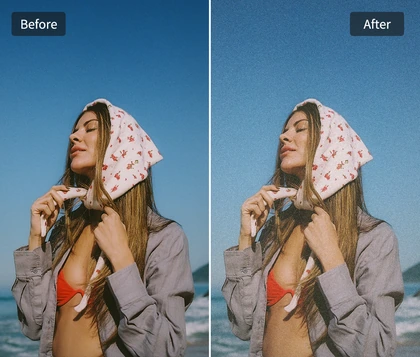
Show a daylight portrait before the sepia effect
Turn a portrait into a warm brown sepia keepsake
BeforeAfter

Why Choose OldRoll for Sepia Photo Effects?

Warm brown tones can turn a recent snapshot into a lasting keepsake. OldRoll brings that character to your photos with adjustable sepia intensity, clear visual details, and free online editing.

View a family portrait in its original colors
Give a family photo a classic sepia palette
BeforeAfter

One-Tap Vintage Sepia Photo Effects

Get a sepia effect in one tap with OldRoll's ready-made filter presets. Color and tonal adjustments are already combined, so you can give photos a vintage look without setting each parameter yourself. Choose a sepia-style filter for a muted brown palette that suits portraits and family memories. Its soft, understated finish brings the character of older prints to digital photos, making sepia photography easy to explore.

Compare light and deep sepia intensity on one portrait

Adjustable Sepia Color Filter Intensity

Control how much warmth your photo takes on with an adjustable sepia color filter. A lighter setting lets some original color show through, helping daylight portraits take on a warm film look. Increase the intensity for a stronger sepia tone filter that pulls varied colors toward a unified, antique palette. This range makes it easier to balance a fresh digital image with the more pronounced character of an old photograph.

See facial contours and fabric in a color portrait
Keep portrait detail visible in warm sepia tones
BeforeAfter

Natural-Looking Sepia Photo Filter Details

Bring warmth to portraits while keeping the details that give each face its character. The sepia photo filter shifts the overall palette toward brown, with facial contours, hair, fabric, and the original light remaining central to the image. On softly lit portraits, a gentler setting gives highlights room to breathe. Deeper tones suit stronger side lighting, where the contrast between light and shadow shapes the face.

Save a finished sepia portrait without a watermark

Free Sepia Downloads Without Watermarks

Keep the finished photo ready for your album or design with a free download at its original resolution. Editing happens online without software installation or account registration, and no added watermark covers the image. Your sepia photo effects stay clear of logos across faces, clothing, or carefully composed backgrounds. From a single portrait to a scrapbook centerpiece, the finished file is yours to save and use.

Where Can You Use OldRoll Sepia Photo Effects?

Sepia gives wedding portraits, family scrapbooks, and creative projects a shared sense of history. Match the depth of the brown tones to the occasion, from gentle romance to a more weathered visual style.

Style a wedding portrait with romantic sepia tones

Wedding and engagement portraits gain a warm, lasting sense of romance with sepia. A gentle sepia tone effect complements lace, cream flowers, and window light, bringing attention to gestures and expressions. Carry that palette into wedding albums, invitation designs, or anniversary keepsakes for a cohesive collection.

How to Add a Sepia Filter to Photos with OldRoll?

  1. Upload Your Photo

    Upload the photo you want to edit in OldRoll. Choose a portrait, family snapshot, or image for a design project to bring into the online photo editor.

  2. Apply and Adjust the Sepia Filter

    Choose a filter to suit your photo's style, such as Chic, Warm, Amber, or Toasted. Adjust the intensity for a muted sepia look or a warmer color finish.

  3. Preview and Download Your Sepia Photo

    Preview the finished photo and download it when you are happy with the result. Save the image at its original resolution without an added OldRoll watermark.

Upload a photo, apply sepia, and download it in OldRoll.

Which OldRoll Filters Suit Your Sepia Photos?

Start with Chic for a muted sepia-style finish, or explore warmer color treatments with Warm, Amber, and Toasted. Choose a preset around your photo's subjects and lighting, then adjust its intensity.

FilterRecommended Photo Types
ChicPortraits, couples, and family photos for a muted, gray-brown sepia look.
WarmStreet scenes, travel snapshots, and outdoor photos for warm brown tones with visible color.
AmberFood, tabletop still life, and warmly lit interiors for a golden, amber-toned finish.
ToastedWooden furniture, home interiors, and still life with wood or cream tones for a warm brown palette.

Frequently Asked Questions About Sepia Filters

Can I adjust the intensity of the sepia filter in OldRoll?

Yes. OldRoll lets you adjust the sepia filter intensity. Use a lighter setting for a gentle warm tint with some original color, or increase it for a richer brown finish inspired by antique photographs.

What does a sepia filter do to a photo?

A sepia filter turns the original colors into a warm brown palette inspired by antique photographs. Light areas take on beige tones, while darker areas become deeper browns, creating a unified, nostalgic finish.

Can I use a sepia filter on portrait photos?

Sepia suits individual portraits, couples, and family photos. Moderate intensity reduces color distractions while keeping facial contours, hair texture, and the original lighting central to the finished image.

Does OldRoll offer a free online sepia filter?

OldRoll's sepia filters are free to use online, with no installation or account registration required. You can adjust the look and download the finished photo without an added watermark covering your image.

Will the sepia filter reduce my photo quality?

Your photo retains its original resolution when exported from OldRoll, without additional export compression. Sepia changes the color treatment while keeping the same image dimensions as the original.

Explore More Vintage Photo Looks with OldRoll