Free Online Kodak Filter for a Classic Film Look

Apply a free online Kodak filter for warm color, soft highlights, and film-like grain. Explore retro looks, customize an orange date stamp, and save your edit at its original resolution without a watermark.

Free · No sign-up · No watermark

Sunlit portrait before Kodak-inspired color editing
Warm Kodak-inspired portrait with subtle film grain
BeforeAfter

Why Choose OldRoll Kodak Filter?

Bring a warmer, more tactile finish to digital photos. Choose a look for your light and subject, then personalize the color, texture, and date stamp.

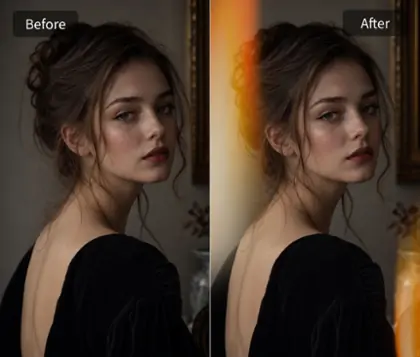
Window-lit portrait before warm film color editing
Golden highlights and film grain on a warm portrait
BeforeAfter

Kodak-Inspired Color Tones

Add warm, nostalgic tones to digital photos with a Kodak photo filter. OldRoll combines rich color, soft highlights, and film-like grain to give photos a vintage look. Golden yellows and warm skin tones bring familiar analog character to everyday moments, creating a Kodak-inspired finish for travel albums and casual portraits.

Compare portrait, street, and sunset Kodak-inspired looks

Multiple Retro Kodak Film Effects

OldRoll offers multiple Kodak-inspired camera filters, including TOY F and TOY D, to make digital photos look like film. TOY F brings warm, retro color, while TOY D draws on the yellow-and-blue palette of classic Kodak disposable cameras. Preview each look on your photo and choose the retro Kodak film effect that suits your portraits, street shots, or travel memories. Apply it in one click, then refine the finish.

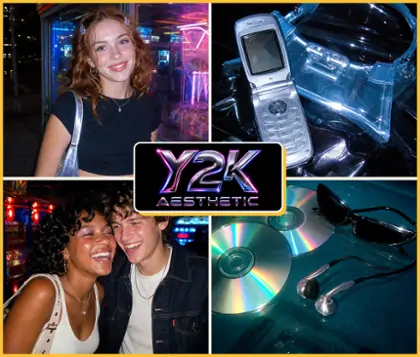
Customize an orange date stamp on a retro party photo

Customizable Vintage Date Stamps

Give photos the familiar orange date stamp of a classic disposable camera with TOY K. Turn it on or off, then customize the year, month, and day to match your memory. A small date stamp can give snapshots a 90s feel in party shots and travel photos, while leaving it off keeps the image clean and lets the color speak for itself.

Adjust grain, vignette, and light leaks on a portrait

One-Click Kodak Photo Editing with Custom Controls

Apply a Kodak effect in one click and fine-tune it in your browser with a live preview. Adjust film grain, vignette, and subtle light leaks to shape the finish around your photo. OldRoll combines quick Kodak photo editing with control over classic film details, so you can create a personal retro look without a lengthy manual color grade.

Save a Kodak-inspired photo online in high resolution

Free Online Kodak Filtering Without Watermark

Use OldRoll's free online Kodak filter to edit photos in your browser and export without a brand watermark. Save at the original image resolution with no additional export compression, keeping the detail available in your source photo. Enjoy a clean, high-resolution finish for your favorite portraits, travel memories, and everyday snapshots.

Where Can You Use OldRoll Kodak Film Filter?

Match the finish to the light already in your photo, from amber sunsets and cafe windows to direct-flash party snapshots.

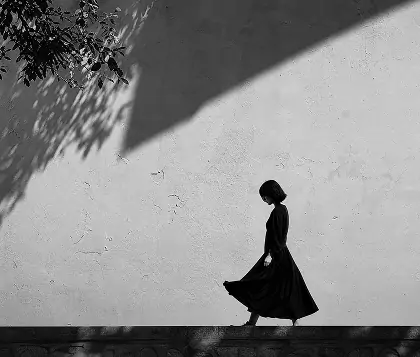
Warm amber tones on a backlit beach portrait

Give beach walks, sunset portraits, and summer road trips a warm amber finish. A Kodak film filter complements existing backlight and sunlit skin, while restrained grain adds texture to open skies. Keep the warmth gentle so pale clouds and white clothing still feel balanced.

How to Apply Kodak Film Effect Online?

  1. Step 1: Choose Your Photo

    Upload a selfie, travel shot, or everyday photo to OldRoll. Start with a well-exposed image and clear details so you can judge the color and texture changes.

  2. Step 2: Apply a Kodak Filter

    Apply TOY K and preview its Kodak-inspired color. Refine grain, vignette, or light leaks. Turn the date stamp on or off, and set its year, month, and day.

  3. Step 3: Preview and Save Your Photo

    Check the finished photo, then download your image online for free in high resolution. Your edited photo is ready for your album or next post.

Upload, apply a Kodak filter, and save your photo

Why Creators Use OldRoll for Kodak Photo Editing

Warm travel memories, softly toned portraits, and dated party snapshots: small editing choices give everyday photos a more personal finish.

Maya

"The warm tones suit my beach photos. I keep the grain light so the sky still looks smooth."

Oliver

"I like the softer look on portraits taken by my apartment window. The colors feel calmer."

Chloe

"Changing the date to our birthday weekend makes the group photo feel like a little keepsake."

Ethan

"The street look works well with red signs and brick buildings in my neighborhood photos."

Sofia

"I leave the date stamp off my outfit photos. The color and a little grain are enough for me."

Noah

"Being able to preview the changes helps me stop before the vignette gets too strong."

Isabel

"I wanted a warm party edit without a logo over my friends. The clean download suits my album."

Lena

"A small light leak adds a nice touch to my road trip pictures. I prefer it subtle."

Avery

"My first edit looked too warm on a white shirt. I adjusted the color until it felt balanced."

Ruby

"I tried a few looks before choosing one for my cafe portrait. Softer contrast worked best."

Explore More OldRoll Photo Effects

Kodak Filter FAQ

What kind of Kodak-inspired look can I create?

OldRoll's Kodak filter adds warm color, soft highlights, and film-like grain for a classic analog mood. Golden tones suit sunset photos, while gentler contrast gives everyday portraits a softer finish.

Can I choose different Kodak film effects?

Yes. OldRoll includes Kodak-inspired camera filters such as TOY F, with warm retro tones, and TOY D, with a classic yellow-and-blue palette. Preview the looks on your photo to choose a style for your subject.

Can I customize or remove the date stamp?

Yes. With TOY K in OldRoll, you can turn the orange date stamp on or off and customize the year, month, and day. Mark a trip, birthday, or party, or leave the stamp off for a clean film-inspired photo.

Can I fine-tune the Kodak filter after applying it?

Yes. Apply a one-click effect in OldRoll, then adjust grain, vignette, and subtle light leaks in your browser. The live preview helps you balance the texture and edge effects for a more personal finish.

Is OldRoll Kodak filter free online and without a watermark?

OldRoll's Kodak filter is free to use online. Save photos without a watermark at their original resolution, with no additional export compression. The final detail depends on the quality of your source photo.