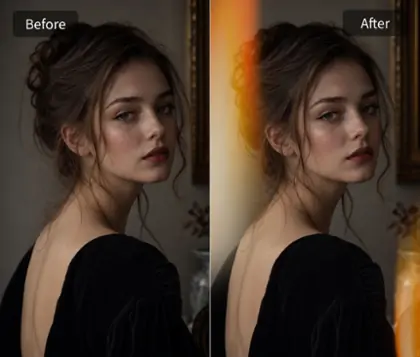
Free Fujifilm Filter Online: Give Photos a Film Look

Give everyday photos warm color and a nostalgic film finish with OldRoll. Explore multiple Fujifilm-inspired filters, fine-tune the light, add a custom orange date stamp, and download free online without an OldRoll watermark.

Free · No sign-up · No watermark

Sunlit portrait before Fujifilm-inspired color editing
Fujifilm-inspired portrait with warm tones and fine grain
BeforeAfter

Why Choose OldRoll Fujifilm Filter for Fuji Film Simulation?

Explore multiple Fujifilm-inspired filters to find the right mood for your photos. Refine the light and make the date stamp part of your story.

Window-lit portrait before film-inspired color editing
Muted greens and warm highlights in a film-style portrait
BeforeAfter

Fujifilm-Inspired Film Colors & Tones

Give digital photos warm, nostalgic tones with OldRoll's Fujifilm filter. Muted greens, warm neutrals, and gentle highlights create a vintage film look for travel diaries and relaxed portraits. Rich color and a tactile finish bring familiar film character to everyday moments, with a personal mood inspired by Fuji film simulation.

Preview multiple Fujifilm-inspired filters on a portrait

Multiple Retro Fujifilm Filter Styles & Presets

Explore multiple Fujifilm filter styles in OldRoll to make photos look like film, then switch between presets in one click. Find a softer mood for portraits, richer color for travel, or a more understated finish for everyday snapshots. Preview each option on your own image and choose the atmosphere you want, without building a color grade from scratch.

Fine-tune exposure, shadows, and grain on a portrait

Easy Fujifilm Photo Editing & Custom Lighting Controls

OldRoll handles the color grading automatically with a one-click Fuji effect and also lets you fine-tune Exposure, Brightness, and Shadows. Brighten a dim portrait, balance the light, or adjust film grain for a softer or more textured finish. Personalize the Fujifilm effect with control over these details, so portraits and everyday snapshots reflect the mood you want.

Set a custom orange date stamp on a birthday photo

Customizable Fujifilm Vintage Date Stamps

Add a familiar orange date stamp to give snapshots a 90s feel. OldRoll lets you switch the stamp on or off and customize the year, month, and day, so a birthday or summer trip carries its own date. Keep it as a small, nostalgic detail in group photos, or turn it off for a clean portrait where the colors and expression take the lead.

Download a Fujifilm-style photo without an OldRoll watermark

Free Online Fujifilm Filter & Watermark-Free Export

Apply a Fujifilm filter online for free and download your photo without an OldRoll watermark. Save the edited image at its original resolution with no additional export compression, keeping the detail available in your source photo. Your finished portraits, travel memories, and casual snapshots are ready for social posts or a personal photo diary.

Where Can You Use the Fujifilm Camera Effects?

From sunlit coastlines to birthday snapshots, match the film-inspired mood to the moments in your camera roll.

Amber sunset tones on a backlit beach portrait

Warm amber tones bring a sunlit glow to sunset landscapes, beach portraits, and summer travel photos. The film-inspired color complements existing backlight, sunlit skin, and golden reflections on water. Sandy neutrals and softened contrast bring a relaxed, sun-faded feel to the memories you want to keep.

How to Apply Fujifilm Film Online?

  1. Step 1: Upload Your Image

    Upload a selfie, portrait, travel photo, or everyday snapshot to OldRoll. Choose an image with clear details so you can see the color and light changes.

  2. Step 2: Apply Fujifilm Filter

    Apply a preset and preview the color. Refine Exposure, Brightness, or Shadows, then turn the orange date stamp on or off and customize the year, month, and day.

  3. Step 3: Download Your Photo

    Preview your finished edit and download it online for free. Save at the original image resolution without an OldRoll watermark or additional export compression.

Upload, apply a Fujifilm filter, and download your photo

Why Creators Use OldRoll for Fujifilm Photo Editing

From sunlit travel diaries to dated birthday snapshots, explore how different film-inspired looks and simple lighting adjustments can shape everyday photos.

Maya

"I like switching between the filters on the same beach portrait. The warmer option suits the late-afternoon light."

Oliver

"Adjusting Shadows helps me bring back some brightness in my cafe photos after choosing a filter."

Chloe

"I set the orange date stamp to our birthday weekend. It makes the group photo feel like a keepsake."

Ethan

"The muted colors work well with the brick walls and denim in my neighborhood snapshots."

Sofia

"I leave the date stamp off my portraits. The film-inspired color is the detail I want people to notice."

Noah

"Being able to preview different presets makes it easier to find a look for my travel album."

Isabel

"The download has no OldRoll logo over the photo, which is useful for the pictures I share on Instagram."

Lena

"I used the same filter on a few coffee-shop photos to give my photo post a consistent mood."

Avery

"My first choice felt too dark for an indoor portrait. Adjusting Brightness helped me find a better balance."

Ruby

"I tried a few presets before settling on a softer color treatment for my window-lit selfie."

Frequently asked questions

Can I use OldRoll Fujifilm filter online for free?

Yes. OldRoll lets you apply a Fujifilm filter online for free and download the edited photo without an OldRoll watermark. Save at the original image resolution, with no additional compression during export.

Can I add or remove the date stamp on my photos?

Yes. OldRoll lets you turn the orange date stamp on or off and customize the year, month, and day. Date your birthday or travel photos, or keep the stamp off to let the Fujifilm-inspired colors stand on their own.

Can I use a Fujifilm filter without a Fujifilm camera?

Yes. You can edit existing phone or camera photos in OldRoll. If you are exploring Fujifilm camera filters for their color, choose from multiple inspired presets without camera recipe settings or a Fujifilm camera.

What photos work best with a Fujifilm filter?

OldRoll's Fujifilm filters suit portraits, travel photos, party shots, and everyday scenes. Switch presets to find the right color mood, then refine Exposure, Brightness, and Shadows to suit your subject and light.

Can I use a Fujifilm filter for Instagram and TikTok?

Yes. Create a coordinated look for Instagram posts, Stories, or TikTok photo posts with OldRoll. Explore multiple Fujifilm-inspired filters, customize the date stamp, and download your photos without an OldRoll watermark.

Explore More OldRoll Photo Effects