Sparkle Filter Free Online: Add Glitter to Photos

Light up your photos with sparkle and glitter effects in a variety of styles. Adjust size and amount for delicate shimmer or bold starbursts that give jewelry, portraits, and party shots extra presence.

Free · No sign-up · No watermark

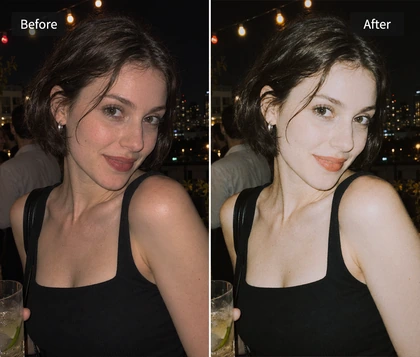
View a party portrait before adding sparkle
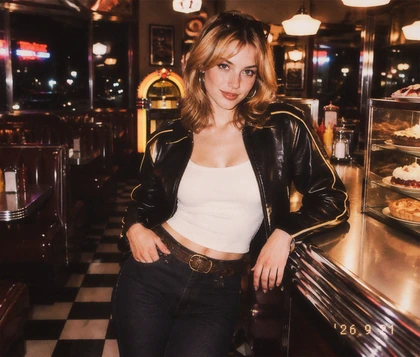
Add a sparkle effect to a Y2K party portrait
BeforeAfter

Why Choose OldRoll Sparkle Filter?

Give reflective details a polished glimmer or make your whole look feel more playful. Choose a style that suits the scene, then shape the finish with two simple controls.

See natural reflections on a polished perfume bottle
Blend subtle sparkle with the original light and texture
BeforeAfter

Real-Looking Sparkle Free from Plasticity

Add refined sparkle that blends naturally with your photo's existing light, shadows, and texture. The starbursts feel like part of the scene, with a balanced finish that keeps the original materials and details visible. Enjoy a realistic, harmonious shimmer without the stiff look of pasted-on stickers or the plastic appearance of heavy overlays.

Explore different sparkle styles on the same photo

Distinct Sparkle Styles for Every Scene

Choose from a variety of sparkle types to suit your photo and personal style. Use OldRoll as a glitter filter or glitter image maker to explore looks from refined shimmer to dreamy retro sparkle. Match the effect to your subject, colors, and creative vision, giving each image a distinct finish that feels personal and keeps your photos from looking alike.

Compare sparkle size and amount in a jewelry photo

Fine-Tune Sparkle Size and Amount

Control how much attention the sparkle draws with separate size and amount adjustments. Smaller sparkles add a fine glimmer, while larger ones make a stronger graphic statement. Reduce the amount to give a close-up breathing room, or increase it for a fuller, more festive finish. Add sparkles to image details with a balance that keeps your subject easy to read.

Compare a portrait before and after Y2K sparkle editing

Y2K and Retro Looks Made Effortless

Give your photos a playful retro finish with sparkle that matches your style. Use the Y2K photo editor to set a nostalgic mood, then add bold sparkles to complement silver accessories, glossy lips, and pink party lighting. Choose a lighter shimmer for dreamy portraits, and adjust the sparkle style, size, and amount until the result feels like your own.

What Can You Do with OldRoll Sparkle Filter?

Match the sparkle to the material and the moment. A polished product close-up, a pearly manicure, and a party portrait each call for a different balance of shine.

Give jewelry and accessories a refined product sparkle

Make jewelry, perfume bottles, and fashion accessories stand out with a refined sparkle that enhances their polished finish. Add a touch of luxury to product listings, highlight a hero item in a campaign, or create eye-catching launch visuals that give shoppers a closer look at your collection.

How to Add a Sparkle Effect to Photos with OldRoll

  1. Step 1: Upload Your Photo

    Upload your photo to OldRoll. Choose a portrait, product shot, or everyday scene with clear details and a little reflected light to build on.

  2. Step 2: Choose a Sparkle Style

    Choose from a variety of sparkle styles and pick your favorite. Adjust the size and amount for subtle shimmer or bold starbursts, checking that the subject stays clear.

  3. Step 3: Preview and Download

    Preview your finished photo and check the sparkle across the frame. When you are happy with the result, download it in high resolution without a watermark for your post, portfolio, or album.

Upload a photo, adjust sparkle, and download your edit

Why Creators Use OldRoll for Sparkle Photo Editing

From polished product shots to romantic wedding portraits and Y2K party posts, see how creators add sparkle and personal style with OldRoll.

Maya

"I like a tiny shimmer on ring photos. Keeping the sparkles small leaves the metalwork easy to see."

Chloe

"The bolder sparkle gives my silver bag and pink party outfit the playful Y2K feel I wanted."

Avery

"I can keep my cat-eye manicure visible and still give the close-up a little extra shine."

Sophie

"A few small sparkles suit my wedding ring photo. The finish feels soft enough for an anniversary post."

Jasmine

"Trying different styles on the same portrait helps me choose between a dreamy look and a party mood."

Lena

"I prefer a subtle finish on perfume photos. Lowering the amount keeps the bottle label clear."

Ruby

"Larger sparkles fit the sequins in my festival outfit. The photo has the energy I wanted for a cover image."

Ella

"I used a light shimmer on a champagne-toned makeup close-up so the eyeshadow still feels like the focus."

Nora

"It took a little adjusting to find the right amount for my necklace shot. Smaller sparkles suited it best."

Isabel

"My first party edit was too busy. Reducing the sparkle size gave the portrait a better balance."

FAQs About Sparkle Effects

Does OldRoll Offer Different Sparkle Effects?

Yes. OldRoll offers a variety of sparkle effects for photos. Explore different styles, then adjust the size and amount to find a finish that suits a polished product shot, a soft portrait, or a bold party look.

Can I Adjust the Size and Amount of Sparkles?

Yes. You can adjust sparkle size and amount separately. Use smaller sparkles and fewer accents for a delicate finish, or increase both for a more noticeable sparkle effect on photos with a festive mood.

How Do I Make My Photos Look Sparkly Without Overdoing It?

Start with a photo that already has some reflected light. Choose a sparkly filter style that suits the scene, then reduce size and amount until facial features, product details, and textures stay easy to see.

Can I Use a Sparkle Filter for Instagram and TikTok?

Yes. Use your edited photo in Instagram posts, Stories, TikTok covers, or photo posts. Check the destination platform's image format and upload requirements, and leave space for any text you plan to add.

Is OldRoll Sparkle Filter Free to Use?

Yes. OldRoll's sparkle filter is free to use online. Upload your photo, choose a sparkle type, adjust size and amount, and download the result. You can explore a subtle shimmer or a bold finish in the same editor.

More Ways to Style Your Photos