

Research through September 22, 2026
Three directions stand out in our review of 2026 photo filter trends:
- The “2016” nostalgia wave is driving interest in the 2016 filter.
- Direct flash is attracting attention for its distinctive lighting.
- Film and instant-camera styles remain part of everyday creation.
Within these trends, 2016 filters, film, and instant-camera looks offer different nostalgic references, while direct flash reflects an interest in distinctive lighting. Combined with early digicam color and image characteristics, it can evoke a retro mood; it also has a place in contemporary portrait and fashion photography.
We examined creative reports, social conversations and coverage in US and European contexts, and OldRoll App usage reports from May through August. Each offers a different view of what people notice, discuss, and make.
2016 Filters Gain Popularity amid the Nostalgia Wave
The 2016 filter has gained attention alongside a wider wave of nostalgia for that year. In 2026, people are revisiting photographs, music, and everyday memories from ten years ago and using nostalgic effects in new photos and videos. The name refers to the era it evokes, not an established release date.
On January 10, the BBC reported TikTok figures showing a 452% rise in searches for “2016” over the preceding week and more than 55 million videos created with its namesake filter.
The BBC describes the filter's vintage, pink-hued appearance through an interview with creator and brand strategist Joel Marlinarson, who connects it to classic Instagram effects. That gives the filter a more specific visual reference: a visible rosy tint that recalls the filtered social photos people remember sharing. Softened contrast can help illustrate that mood, but neither pink tones nor faded shadows belong exclusively to 2016.
The wider cultural conversation supports this reading. On January 14, US television host Ryan Seacrest revisited 2016 on Instagram, recalling less polished posts and stronger filters. HuffPost France covered the same nostalgia wave, including Snapchat filters and saturated imagery. Those references span several looks, held together by memories of social sharing.
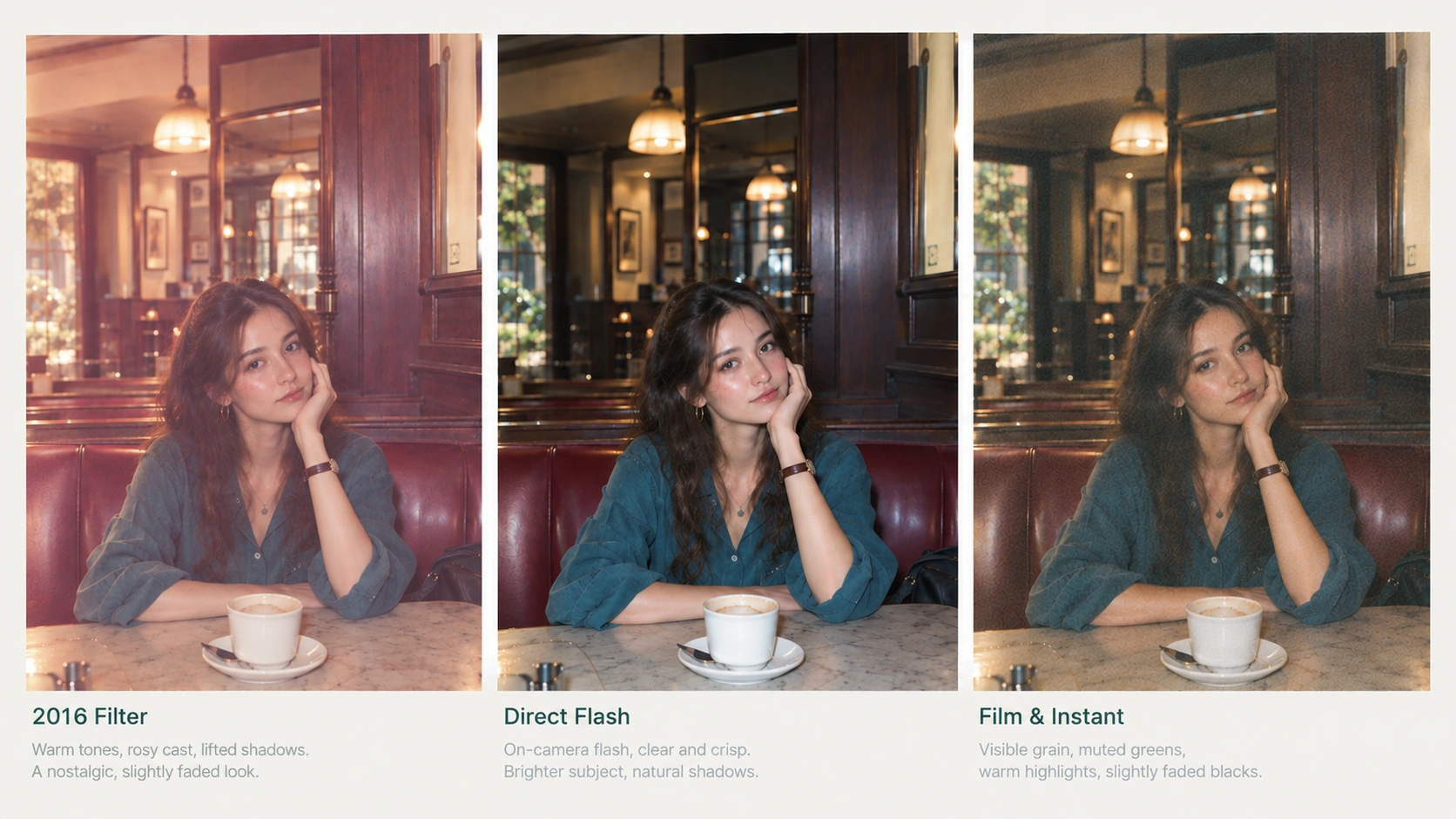
For editing today, a casual portrait or travel snapshot offers a useful starting point. A gentle rose tint and softer contrast can suggest an older Instagram feed while keeping faces and surroundings recognizable. The comparison below illustrates that treatment; it does not recreate a specific historical preset.
Our reading is that retro photography now includes nostalgia for the smartphone and social-media era. Alongside film stocks and old cameras, the look of a remembered feed can guide an edit. For OldRoll, that makes the sharing habits and color treatments associated with a photograph useful references alongside the camera that inspired it.
Direct Flash Draws Attention
The direct-flash look is recognizable through its light: a nearby subject appears bright, the background falls darker, and shadows have a defined edge. Reflections on skin, glass, or clothing can make a photograph feel immediate and close.
That appearance became a specific editing conversation in spring 2026. On April 20, The Tab explained Instagram’s AI flash effects, including Flash, Flash III, and Dirty flash. Three days later, photographer Hillary K. Grigonis discussed how to create the retro-flash look with a camera in Digital Camera World.
The connection to compact digital photography is easy to see. Friends gathered around a table, an outfit photographed before a night out, or a quick portrait after dark all give direct flash something to work with: a nearby subject and an environment that can recede behind it. Refinery29’s June 2026 coverage of the digicam trend describes people bringing compact cameras to parties again, using flash to capture outfits and friends before they have time to pose. The article links the appeal of strong flash, grain, and occasional blur to the spontaneous feeling these photographs preserve.
A cafe portrait with a direct-flash-style treatment: a brighter subject, more pronounced reflections on skin and clothing, and a relatively darker background.
A dim restaurant, an indoor party, or a street lit by scattered lamps can provide an atmospheric background while leaving nearby faces poorly lit. When friends are talking, turning, or raising a glass, direct flash at close range can add light to the people and help capture those passing expressions and gestures.
In low light, phones and cameras often need a higher ISO, which can make noise more visible and affect image quality. Canon's low-light photography guide also notes the risk of increased noise at high ISO settings.
Within its effective range, direct flash illuminates nearby people, bringing out facial details, clothing, and reflections. A more distant background receives less flash, so suitable exposure settings can create a bright subject against darker surroundings. That lighting relationship gives the direct-flash look its structure. Particular color treatments and grain can also give it a retro finish. For photographs already taken without flash, editing tools that support AI flash effects offer a way to try simulating on-camera flash lighting.
Film and Instant-Camera Styles Remain Popular
Film-inspired editing continues to offer a different kind of photographic character: color shaped by the treatment, visible texture, and a particular relationship between bright and shaded areas. Instant-camera looks add another reference, the appearance and presentation of a small physical print.
In its 2026 design-trends article, Picsart identifies old Polaroid-style backgrounds through faded edges, light leaks, and soft grain. It also discusses paper textures and photo-based layouts. These are editorial observations about visual style, and they give useful context to what we see in OldRoll usage.
Save Trends for OldRoll’s film Filter
OldRoll save data provides a concrete example of the continuing appeal of film-inspired editing. In both report groups, the film editor filter moved from roughly 5% to 6% of filter saves in May to about 9% in August, when it ranked third in each group.
Source: OldRoll mobile app.
The film filter accounted for a higher share of OldRoll editor-filter saves in August than in May. Interest in film-inspired looks is visible in the edits users choose to keep, giving this treatment an ongoing place in everyday photo editing.
TOY F and INSP: Top Five Across Four Reporting Periods
Camera save rankings also show an established place for film and instant-camera styles in OldRoll usage. TOY F and INSP ranked in the top five in both report groups across all four windows. Within those results, TOY F, part of the disposable-camera range, stayed second in the Google Play reports, while the instant-camera experience INSP stayed third in both groups.
| Camera | Report group | May rank | June rank | July rank | August rank |
|---|---|---|---|---|---|
| TOY F | Google Play | 2 | 2 | 2 | 2 |
| TOY F | iOS overseas | 4 | 4 | 5 | 5 |
| INSP | Google Play | 3 | 3 | 3 | 3 |
| INSP | iOS overseas | 3 | 3 | 3 | 3 |
Source: OldRoll mobile app.
The film filter’s share of saves rose from roughly 5% to 6% in May to about 9% in August, while TOY F and INSP stayed in the top five for camera saves across all four windows. Film and instant-camera styles continue to feature in the images OldRoll users save, remaining popular choices for everyday photography.
The Visual Characteristics of Disposable Film and Instant-Camera Looks
Disposable film photographs can show fine grain and warm tones, with some cameras adding a slight magenta cast to skin tones and whites. Grain visibility, color, and sharpness vary with the film and lens; in good light, these cameras can also retain clearly defined subjects and vivid color. On the left below, the film-inspired edit keeps the sea blue, the chair red, and the contrast between sunlight and shade distinct. It illustrates one direction to explore with a film filter.
Instant-camera looks can give a scene a softer, print-like finish through gentle color shifts, lower contrast, and less sharply defined detail. A paper border completes the feeling of a photograph to hold or keep in an album. On the right, softer blue-green tones, warm highlights, and a white border give the same coastal scene a different nostalgic mood.
Left: a film-inspired look with vivid color and distinct contrast. Right: softer instant-camera tones with a paper border.
What Do These Trends Mean for Photo Editing?
Nostalgia Is Becoming More Specific
Interest in the 2016 filter, film-inspired images, and instant-camera looks points toward several forms of nostalgia existing together. Each offers a different reference for how a moment should feel.
There is a broader emotional context. In Popsa’s The Memory Economy 2026, based on a Censuswide survey of 8,000 people across the US, UK, France, and Germany in February, 54% identified nostalgia among the emotions associated with revisiting old photos. Happiness followed at 44%.
Replotted from The Memory Economy 2026, PDF page 6. Responses concern old photographs; they do not measure filter preferences.
Nostalgia and happiness were the emotions most often associated with revisiting old photographs. That offers one explanation for the appeal of retro aesthetics: familiar faces, everyday moments, and the feelings attached to them give old images personal meaning. Film grain, gentle color shifts, or early Instagram-style treatments can act as visual reminders of those memories. Bringing familiar photographic qualities into a new image may help it carry some of that warmth, making emotional connection one way to understand the preference for nostalgic looks.
Nostalgic Aesthetics Are Returning Through Different Filters
The popularity of the 2016 filter and retro interpretations of film and instant-camera photography can be understood as different expressions of an interest in nostalgia. Part of their appeal lies in the wish to reconnect with familiar moments: a childhood family portrait or a photograph from a trip with friends can bring back the companionship and happiness associated with that time. Grain, color shifts, or softer contrast can recall those memories and lend a sense of familiarity and warmth to photographs made today.
These trends also reveal different creative uses for filters. The 2016 filter establishes a mood through conspicuous color treatment; film effects shape texture through grain and tone; instant-camera effects give an image the presentation of a keepsake. Choosing a filter can therefore begin with what the photograph should express: a stronger mood, a textured finish, or the feeling of a memento.
Retro aesthetics are making room for more decades, media, and personal memories. Some people connect with film grain and paper borders; others recognize the strong tints of early social-media photographs. Each look offers a different way to bring those associations into pictures of life today.
Find a Look That Fits Your Photo
Start with the color, texture, and mood you want your photograph to have. Do you prefer vivid or softer tones? Crisp detail or a little film grain? A clear visual direction makes it easier to compare filters and find a treatment that suits the picture.
There are more retro looks to explore beyond those covered here. A Y2K filter offers another direction for people drawn to the color and atmosphere of early digital photographs, whether they are editing an outfit shot, a portrait, or a picture from a party.
For a look inspired by compact digital cameras, try a digicam filter. Compare how different treatments handle skin tones, color, and contrast to find a digital-camera look that suits your photograph.
Upload a favorite photo to OldRoll aesthetic photo editor and explore a few vintage filters to find the colors and textures that suit your style:
- Upload the photo you want to edit.
- Browse the vintage filters and click to apply an effect. Compare a few styles on the same photo.
- Drag the slider to adjust the filter strength until you find the color and texture you like.
- Download your edited photo once you are happy with the result.
Find Your Vintage Look
Upload your photo to OldRoll and try a variety of vintage filters to find the colors and textures you love.
Try OldRoll